Wedding seating chart maker: which one still helps after someone cancels?
wedding.studio, Zola, WeddingWire, SeatPlan.io, Seat Maker, Tablee. Which wedding seating chart maker is worth your evening, and which one survives a cancellation.

Search for a wedding seating chart maker and you will find a dozen of them, several genuinely free, and a long trail of Reddit threads asking which one is any good. The top answer on the most-read of those threads is that sticky notes on the dining table worked better than the app.
That answer is a fair summary of the category. Most of these tools are good at the first plan and no help whatever with the second.
The state of the category
Two things are worth knowing before you pick.
The free tools are genuinely good. This is not a market where you have to pay to get anything usable. wedding.studio gives you a full seating chart in your browser with no guest limit and no account. Zola and WeddingWire include a seating tool free with their planners, wired straight to your RSVPs. You can get to a finished chart in one evening without spending anything.
The apps are a different story. Roughly a dozen dedicated seating apps sit on the US App Store and, as of September 2026, very few of them climb above four stars. The big wedding planners dominate instead: The Knot and WeddingWire have hundreds of thousands of ratings between them, with seating as one feature among many. Tablee, for the record, is new enough that it has no ratings yet.
So the question is not really which one is free. It is which one is still useful on the Tuesday evening, ten days out, when your aunt calls to say she cannot come.
The free tools, and what each is actually for
wedding.studio
The most generous thing on this list. Full designer in the browser, no guest limit, no account needed, paste your list straight from a spreadsheet and it detects the columns. It exports PNG, PDF, CSV and JSON, and there is an auto-seat button that fills remaining seats in one click.
That auto-seat is worth understanding: it fills empty chairs, it does not weigh up who should sit with whom. Useful for the last stragglers, not for the hard part.
Zola
The right answer if your guest list already lives there. “No importing. No manual entry. Your confirmed guests are automatically pulled in from your Zola wedding guest list.” Group tags, alphabetical sorting and a print-ready PDF for your venue.
It organizes beautifully and decides nothing. You place every person yourself.
WeddingWire
Much the same trade: free, tied to your WeddingWire guest list, circular or square tables, custom areas. On the Reddit threads it is the tool people most often say they settled for. “It isn’t the fanciest but it helps me visualize.” That is an accurate review.
Canva
Worth naming because it ranks for every seating search, and because people misunderstand what it is for. Canva makes the printed sign that guests read at the door. It is excellent at that and completely blind to your guest list. Use it after the plan exists, not to build one.
The paid options

SeatPlan.io
Free full designer with no signup, then £8 as a one-time payment to save and export for 90 days, £14 to add real-time collaboration. Its distinctive trick is AI import: “Upload a photo or PDF and AI builds the layout for you.” One free import a month.
If your venue sent you a floor plan PDF, this saves a real chunk of work. Placement itself is manual.
Planning.Wedding
Drag and drop, Excel import, real-scale measurements, place cards, PDF and Excel export, no signup, and shared access for your whole wedding party. It is the only tool here built for two people to work at once. Placement, again, is by hand.
Seat Maker
The most established iPhone app in this space, and it goes further than Tablee on hardware: iPhone, iPad and Apple silicon Macs, plus a browser planner on pro accounts. Import from Contacts or a CSV, share as a message, an image, a PDF or a QR code. Free to start, with an in-app subscription for the advanced features.
Its seating is drag and drop, with a “shuffle and lock VIPs” option that reshuffles the room while keeping the people you locked. That is closer than most to what you want, but a shuffle is not a solver: it does not know that the Dupont family should sit together.
The test nobody passes: a cancellation
Here is how to separate these tools in one question. What happens the day someone drops out?
In every tool above, the answer is the same. You delete the name. A chair goes empty at table 3. The careful balance you spent three evenings building no longer holds, and putting it back is entirely your problem. You are back to moving sticky notes, except now they are on a screen.
This is the gap Tablee was built around, and it is the only honest reason to prefer it.
You state your rules rather than dragging names: at the same table, at a different table, side by side. Each rule carries a weight (if possible, important, essential) and any rule can be marked strict, in which case it is never broken.
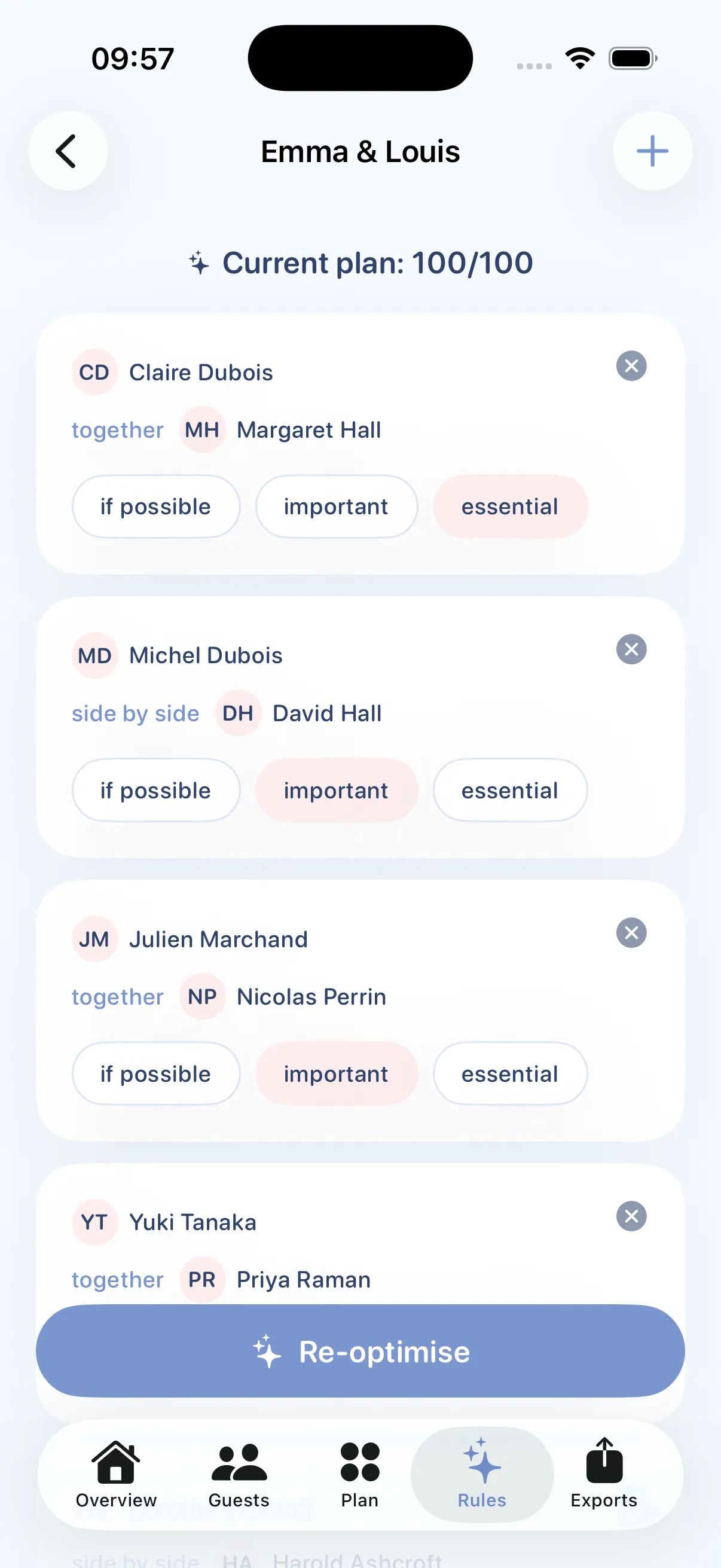
You state the rules
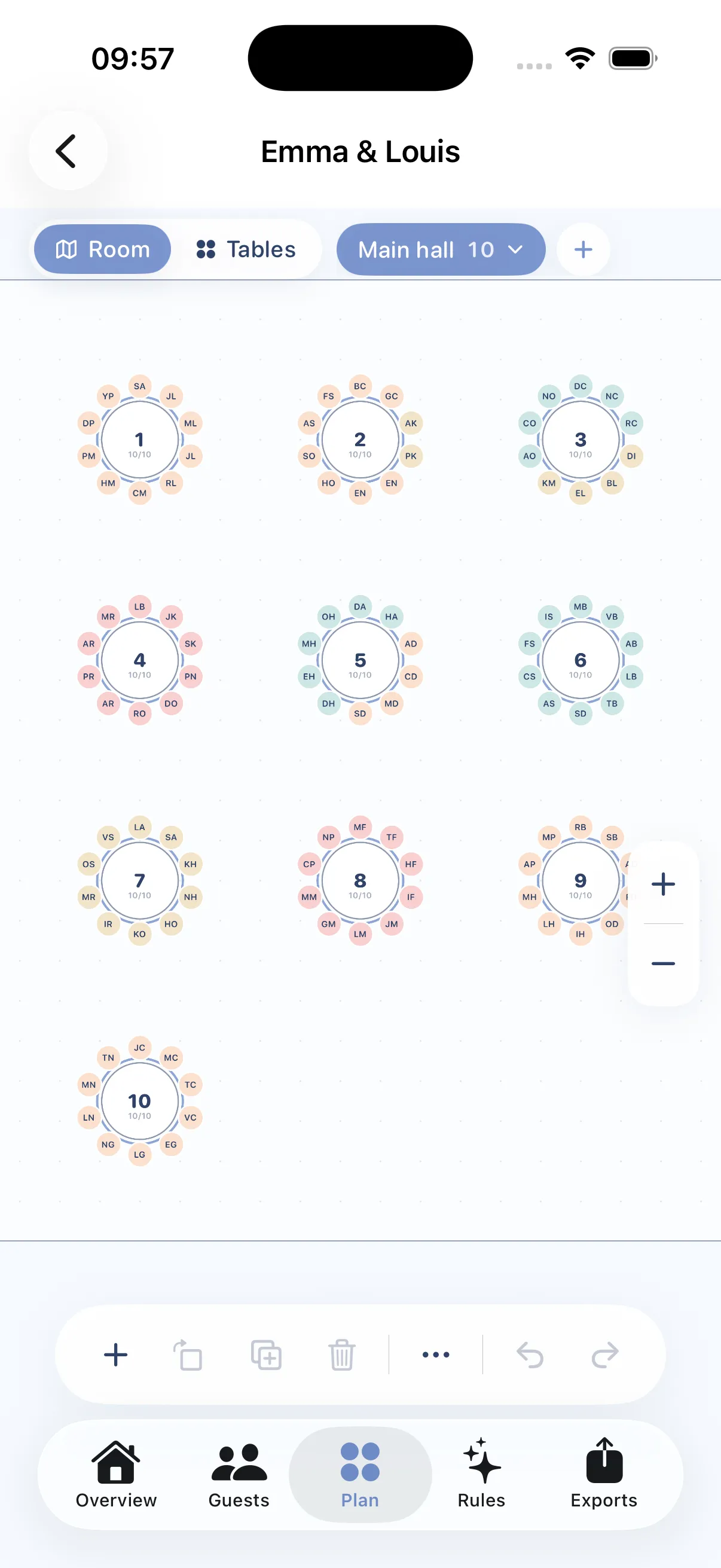
The app builds the plan
Then three things happen that the rest of this list does not do.
It tells you what it gave up. You get a score out of 100 and the list of rules it could not honor, each with a reason (“table 5 was full”) and a link to the table involved. You know exactly what you traded, instead of wondering.

The score and the trade-offs, in plain sight
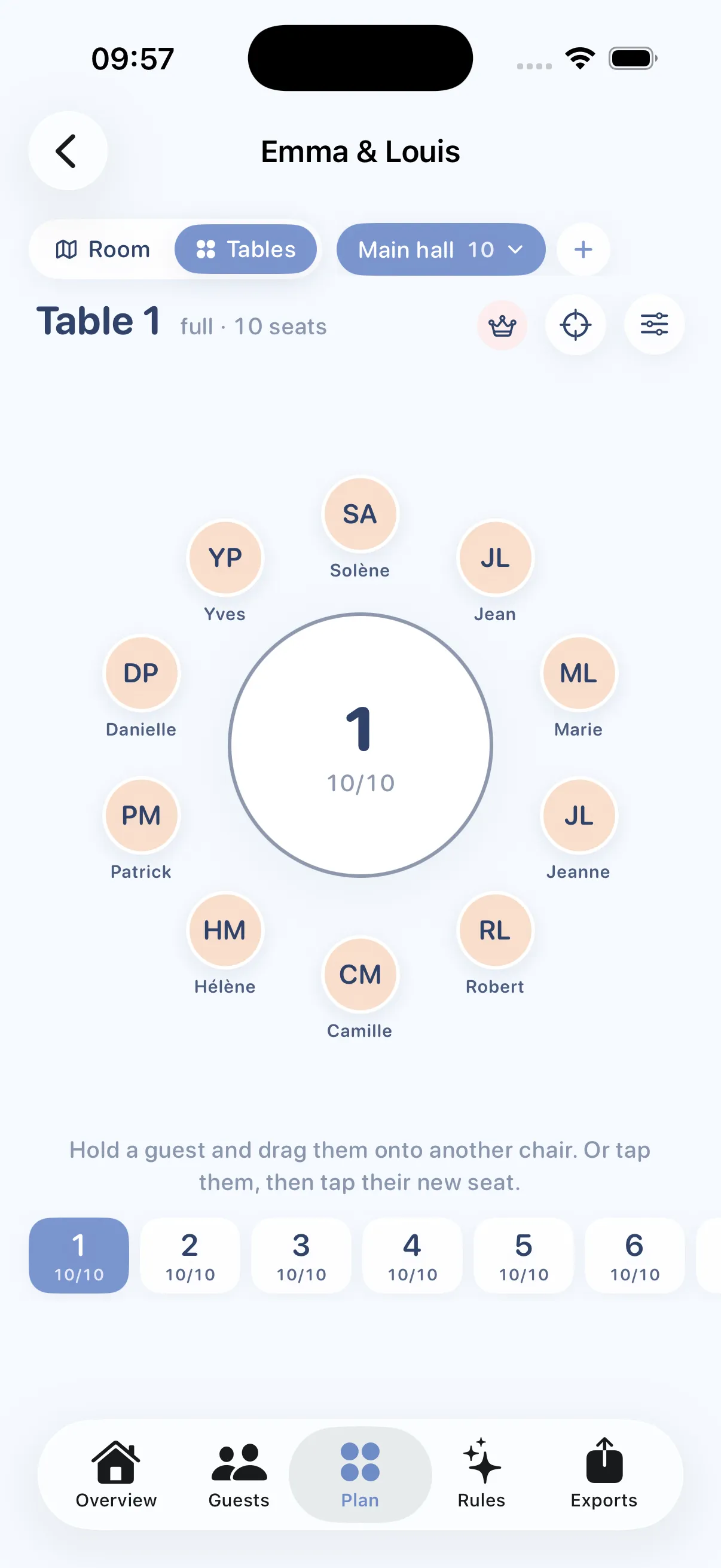
Every guest on a specific chair
It re-seats without starting over. Remove a guest, run it again, and the plan rebuilds by moving as few people as possible. The seats you already have act as anchors.
What you pin stays pinned. Move someone by hand, pin them, re-run the seating as often as you like: that placement is never undone.
Pricing is free up to 5 tables with the full engine, $8.99 once for an event up to 200 tables, and $79.99 a year for planners running one wedding after another.
What Tablee does not do
A comparison where the author’s own product wins on every line is worth nothing. Five honest limits.
- Only one native app. On Windows, Mac or Android you use the web app in a browser, with an account and no offline mode. Seat Maker at least covers the Mac natively.
- The two purchases are separate. Unlocking an event in the web app does not unlock it in the iPhone app, and an in-app purchase does not unlock the web app. Work in progress.
- The free tier is smaller than the competition’s. Five tables against wedding.studio’s unlimited guests. If your wedding is simple, wedding.studio is the better free deal and it is not close.
- iCloud sync connects your own devices, not your partner’s Apple Account. For two people working at once, Planning.Wedding is the only real option here.
- No online RSVP and no shareable link. You arrive with your list already made. Zola and WeddingWire own that ground.
The comparison
Checked on each vendor’s own site in September 2026. Prices move, so verify before you pay.
| Tool | Platform | Free tier | Paid | Rule-based seating | Account |
|---|---|---|---|---|---|
| wedding.studio | Web | Unlimited guests | Optional prints | No, auto-fill only | No |
| Zola | Web, iOS | Free with planner | None | No | Yes |
| WeddingWire | Web, iOS | Free with planner | None | No | Yes |
| Canva | Web, iOS, Android | Free | None needed | Not a seating tool | Yes |
| SeatPlan.io | Web | Full designer | £8 one-time | No, AI layout import | No |
| Planning.Wedding | Web | Yes | Not published | No | No |
| Seat Maker | iPhone, iPad, Mac | Free to start | Subscription | No, shuffle and lock | No |
| Tablee | iPhone, iPad | 5 tables | $8.99 one-time | Yes | No |
How to choose
Your list is short and nobody has to be kept apart
Use wedding.studio and spend nothing. Sixty guests around six tables with no feuds is a job for a drawing tool, and a seating engine adds nothing.
Your guest list and RSVPs already live in Zola or WeddingWire
Use their seating tool. Having your confirmed guests appear without any importing is worth more than any placement feature, and both are free.
A hundred guests or more, divorced parents, a table nobody wants to sit at
This is the only case where a seating engine earns its keep. On an iPhone or iPad, Tablee costs $8.99 once and gives you back your evenings. On a computer, no tool on this list will decide for you, so budget the evenings instead.
You and your partner want to work on it together
Planning.Wedding. Shared access to one project is its differentiator, and nothing else here matches it.
You are a planner, a caterer or a venue
You want a subscription rather than a per-wedding payment, and you should judge on exports above all, since that is what you send to the chef and the setup crew. SeatPlan.io’s Event Manager tier, or Tablee Pro at $79.99 a year if you work on an iPad.
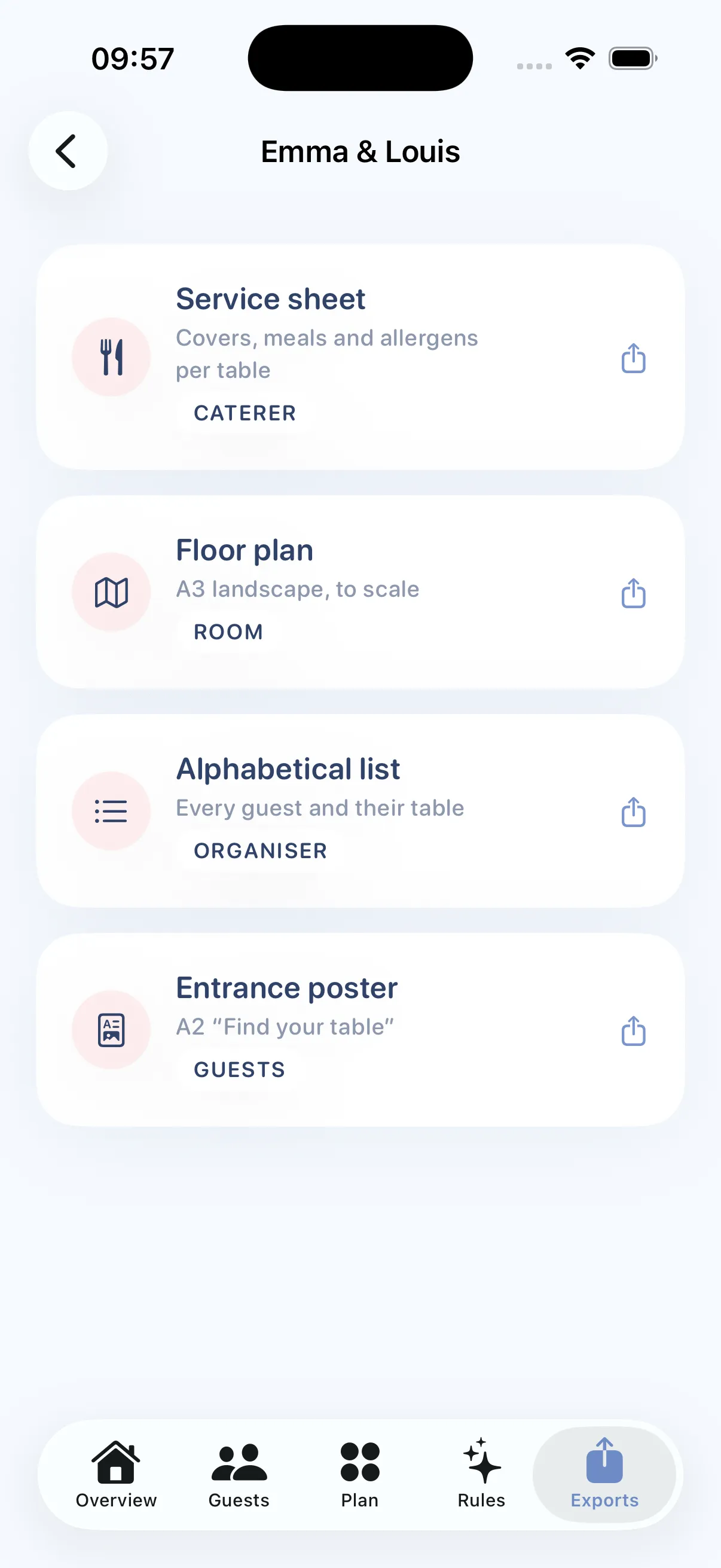
The four PDFs, generated on the device
What to take away
The free wedding seating chart makers are better than this category’s reputation suggests. If your seating is straightforward, start with wedding.studio or whichever planner already holds your guest list, and stop reading here.
If what is stopping you is the decision rather than the drawing, and especially if you expect late changes, the shortlist is short. Tablee is the one built to survive them.