Wedding guest list: how many to invite, who, and how to decide without hurt feelings
How many guests, who to invite, A list and B list, plus-ones, kids, tracking RSVPs: a method to decide, and the guest list that becomes your seating chart.

Nearly every guide says “build circles of closest people.” Few tell you how many to invite, or how to decide when the list overflows. Here is a method in four steps: a ceiling, an A list, an ordered B list, written rules. Tablee, our product, then turns that list into a seating chart, and this page works without it too.
Your guest list becomes your seating chart: paste it into Tablee
A guest list is the starting point of the chart, so enter it once. In Tablee, the “Add your guests” screen takes your list as it is.
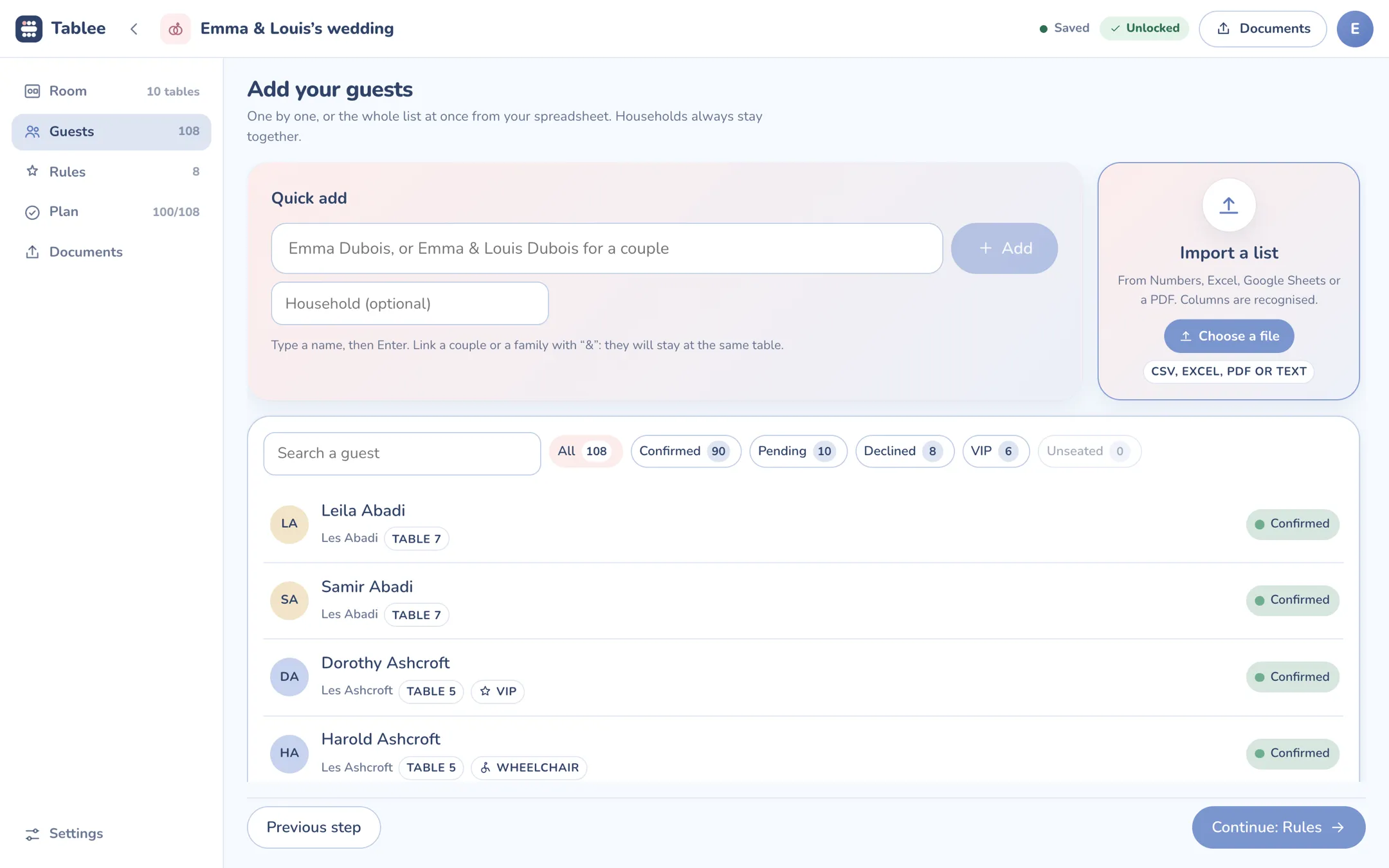
- Quick add. You type a name, or “Emma & Louis Dubois” for a couple: people linked with “&” stay at the same table.
- Import. You paste your list from Excel, Numbers or Google Sheets (or a CSV, PDF or text): the columns are recognized, and households stay together.
- Tracking. Each guest has a status (invited, pending, confirmed, declined), and filters show at a glance how many are confirmed, how many are waiting and how many declined.
The path. You paste the list, check the households, set each guest’s status, then set your rules and build the chart: see the full method for making a seating chart.
What Tablee does not do, to be upfront. It does not send invitations and does not collect replies: statuses are entered by hand. It has no “B list” either: it tracks each guest’s reply status.
Prices, plainly. It is free for one event up to 5 tables: the documents carry a “Made with Tablee” line. 9.99 € once removes the line and goes up to 200 tables, for that event.
Create my free account Sign in
You can also start on the home page, where you can build your seating chart online and watch the demo.
Your list does not count guests: it counts households and plates
The trap in a list is the wording on the invitation. “The Lopez family” or “Mr. and Mrs. Lopez and family” does not say how many plates: a list of 80 names can hide 120.
| On the invitation | Plates | The trap |
|---|---|---|
| “Camille Martin” | 1 | None |
| “Camille Martin and Julien Roux” | 2 | None, if both are named |
| “Mr. and Mrs. Lopez and their children Léa and Tom” | 4 | Name each child, or nobody knows which |
| “The Lopez family” | 2 to 8, or more | Adult kids, partners, grandparents: everything stays open |
| “Camille Martin and guest” | 2 | A companion you do not know yet |
The method takes three moves: name each person invited, group by household, and add up the plates before you send the invitations, not after the replies. For the next step (the household as the unit of the chart), see the full method for making a seating chart.
How many to invite: a ceiling, not a wish
There is no right number of guests: there is a ceiling. It is the smaller of two figures.
Venue capacity: the brochure number is a maximum
Ask the venue or caterer how many seats fit comfortably at each table, walkways included: the brochure number is often a maximum. Ten round tables of ten seats make a hundred seats, not a hundred guests at ease.
Budget: what one more guest costs
Each guest adds a plate, a chair and a share of drinks. Divide the part of your budget that depends on headcount (the meal, the bar, the rentals) by the cost of one plate.
An illustrated example, invented for the exercise. The venue seats 150 comfortably. The meal and bar have $24,000, at $190 a plate: that pays for 126 guests. The ceiling is 126, not 150.
The ceiling is on attendance, not on invitations. US guides assume that some invited guests decline (one cites 10 to 20 percent of an A list). With 15 percent declining, about 148 invitations fill 126 seats. That is why a B list exists: it covers the gap when more people decline than you expected. These rates vary by couple, so treat them as a starting guess.
A few benchmarks: The Knot’s 2026 Real Weddings Study, based on about 10,000 US couples married in 2025, reports an average of 117 guests and $292 spent per guest. These are averages: your venue and caterer have their own numbers.
Who to invite: circles, and the reaction test
Start with close family, then close friends, then the rest. When you have to cut, one simple test: if this person were not there, how would you feel? A big disappointment means the A list.

Guides add criteria: reciprocity (did they invite you to theirs?), recent contact, the person’s impact on your life. Treat them as questions, not laws. One common way to split seats is half for the couple and a quarter for each set of parents, adjusted if one side is paying more.
Two precautions. Balance both sides, or the tables will be lopsided later. And listen to your parents, who have their own circles, without letting them decide alone: a name added reluctantly is one more plate.
A list and B list: how to use them without offending anyone
The principle. The A list holds the must-invites, who get their invitation first. The B list holds the people you would like to invite if seats open up. You rank it, with the people bumped from the A list at the top, and you invite them as others decline.
The risk, plainly. Some couples and guests consider a B list rude: if someone does not make the first round, why invite them at all? Opinions differ, and the sources that discuss it are mostly forums. Weigh how the person would feel if they worked it out.
Three ways to avoid one
- Shrink the A list until it fits the ceiling, even if it means cutting names.
- Invite to part of the day only. Some people matter to you but do not fit at the dinner. That means two numbers for your caterer: see what to give your caterer.
- A second, smaller gathering, or a moment on its own with the people who could not come.
If you keep one
- Send early: guests compare, and a late invitation shows.
- Give B-list guests a slightly later reply date, so they are not asked to answer before the first round has.
- Never call it a B list.
- Set a cutoff date before your caterer’s final headcount: after it, no more invitations.

Plus-ones and kids: write the rules before you print the invitations
Two decisions derail a list: plus-ones, and children. Take them before printing, and apply them to everyone.
| Rule | Effect on the list | What to write on the invitation |
|---|---|---|
| A plus-one for married, engaged and long-term couples | Limits it to known partners | Name the partner |
| A plus-one for everyone | Can double the number of single guests | “And guest” |
| No plus-ones | Simple, but you must hold the line for all | Name only the person invited |
| Kids of close family only | Calmer tables, fewer plates | Name the children invited |
| Adults only | A choice you own, and warn people about early | A clear sentence, no apology |
A principle: the invitation names who is invited. Unmarked invitations are generally read as one person, and wording such as “and guest” tells the invitee they may bring someone of their choice. If you know the partner’s name, writing it is more thoughtful than “and guest.” To say it without offending, one sentence is enough: “We are delighted to invite Camille and Julien.”

Tracking replies: the list becomes a dashboard
One status column is enough: invited, pending, confirmed, declined. Set your RSVP deadline before the one your caterer asks for, with a week or two to follow up (see what to give your caterer). Most guides put it three to four weeks before the wedding, four to six for travel.
- One follow-up, a message to everyone still pending. Sources differ on when to start: a few days to a week after the deadline.
- A decision for non-responders: count them or not. One guide suggests assuming they are not coming after a few attempts; that is a bet to discuss with your caterer.
- A current number, every week: how many confirmed, how many pending, how many declined.
A spreadsheet tracks this very well, with a drop-down for the status. It breaks when the list has to become a chart: you retype the names, one by one. Its limits are covered in our comparison of seating chart makers.

The seven columns to set up from day one so the list becomes a chart
A tidy list imports in one go. Here are the columns to set up, which Tablee recognizes on import.
| Column | Why | Example |
|---|---|---|
| First name | For the name on the documents | Camille |
| Last name | To sort the alphabetical list | Martin |
| Household | To keep a family or couple together | The Martins |
| Group | For the rules: side, circle, friends | Bride’s friends |
| Status | To know who has to be seated | Confirmed |
| Meal | For the caterer’s sheet | Vegetarian |
| Allergies | For the caterer’s sheet | Peanuts |
Two optional columns complete the set: child (for meals and tables) and VIP (a visible marker in the list). If your file is already built, do not redo it: rename the columns and paste it.